Excel · Data Analytics · Logistics

Logistics Performance Analysis Dashboard

A deep-dive analysis of 3,000 delivery records across South Africa's major cities — uncovering route inefficiencies, vehicle cost gaps, and the operational patterns driving a 31% late delivery rate.

ToolMicrosoft Excel
Records3,000 Deliveries
Coverage6 Cities · 5 Routes · 3 Vehicles
PeriodJan – Dec 2024

What This Project Is About

This project was built as a portfolio case study targeting logistics and transport companies across Nigeria and Africa. Using a structured operational dataset, the goal was to go beyond surface-level reporting — identifying specific, actionable problems a logistics company could solve with better data practices.

The entire analysis was conducted in Microsoft Excel using PivotTables, PivotCharts, structured formulas, and an interactive slicer-driven dashboard — demonstrating what a skilled data analyst can extract from operational data without writing a single line of code.
3000
Delivery records analysed
6
Major South African cities
5
Distinct delivery routes
3
Vehicle types tracked
12
Months of operations data
R12.9M
Total revenue in dataset

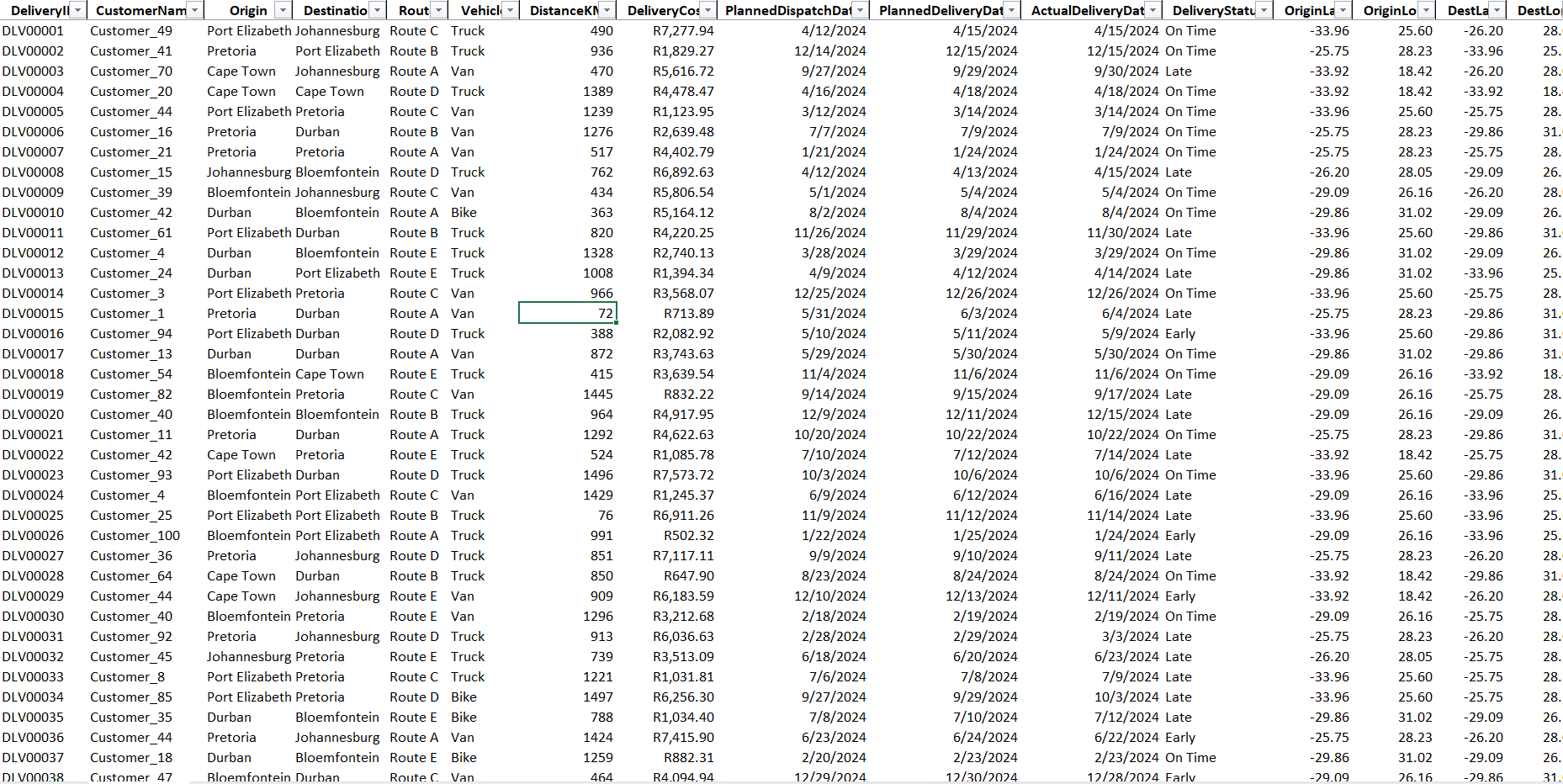
Raw Dataset
Raw Dataset sheet

How the Analysis Was Built

The project followed a structured, reproducible six-step workflow — from raw data preparation through to an interactive dashboard designed for non-technical stakeholders.

1

Data Preparation & Table Structuring

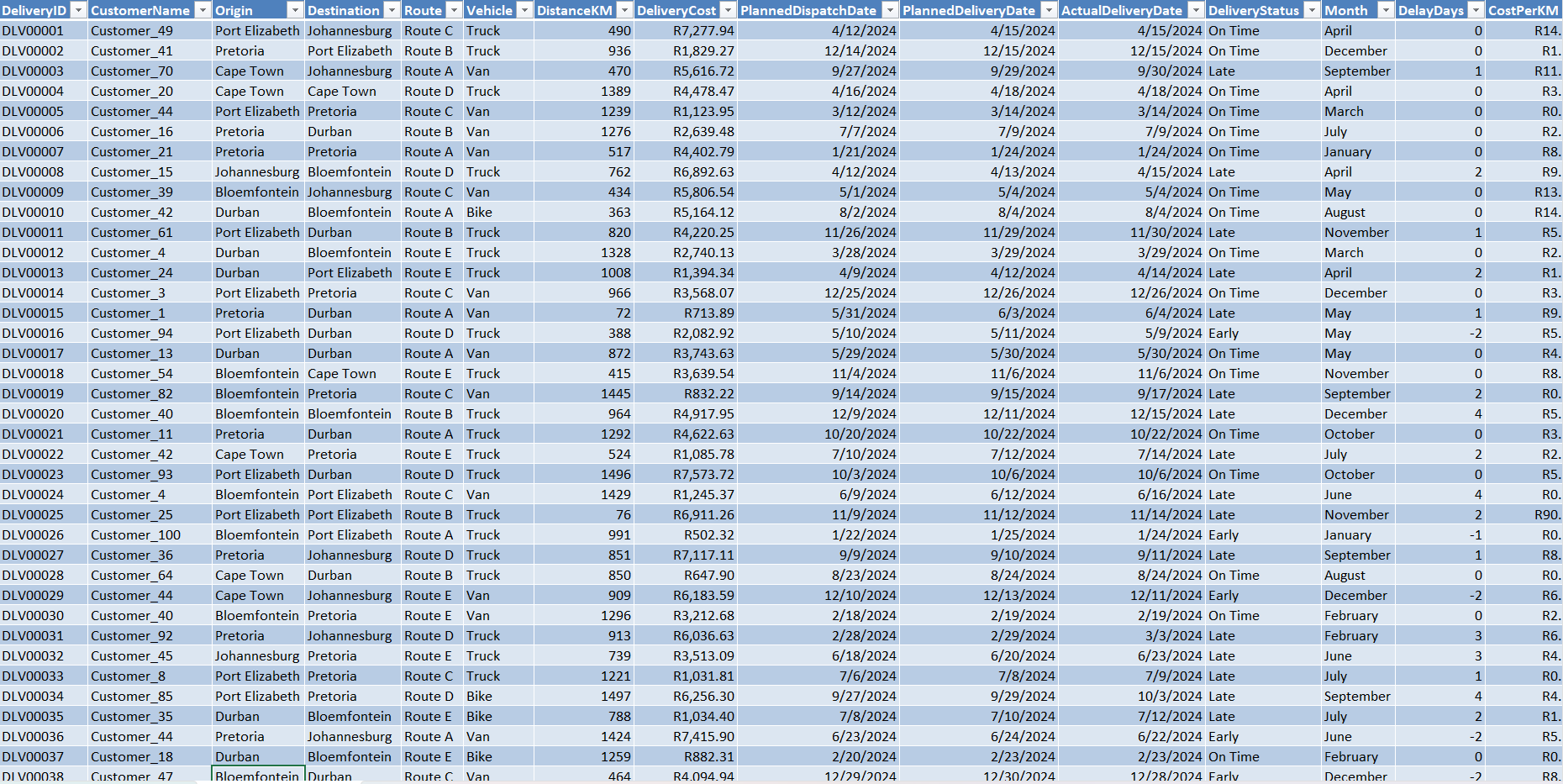
The Transformed dataset was converted into a named Excel Table (LogisticsData) enabling structured column references. Three helper columns were added:

Month =TEXT(PlannedDispatchDate, "MMMM") Delay Days =ActualDeliveryDate - PlannedDeliveryDate CostPerKM =DeliveryCost / DistanceKM

This transformed raw dates into measurable dimensions — enabling monthly trend and delay severity analysis across all 3,000 records.
Transformed Dataset
Transformed Dataset sheet — the original raw data was converted into a named Excel Table, enabling structured references and dynamic analysis. Three new columns (Month, Delay Days and CostPerKM) were added to create key analytical dimensions for the dashboard.
2

KPI Summary

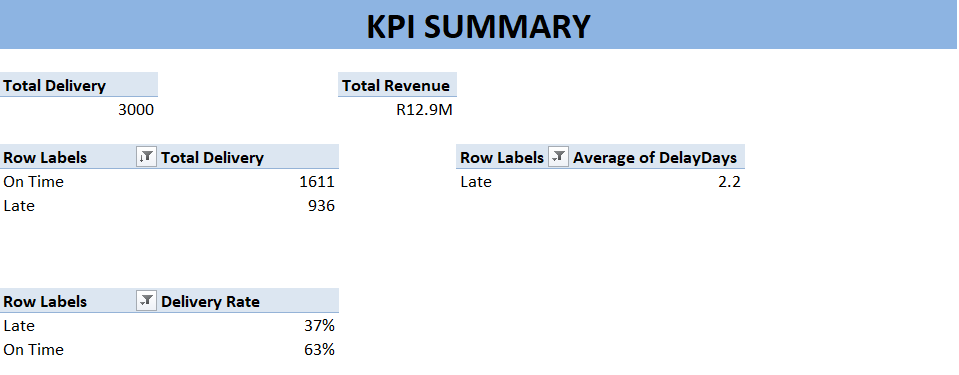
A dedicated KPI sheet computed top-line business metrics dynamically using Pivot Tables

These cells feed the dashboard KPI cards live — updating automatically when source data changes.
KPI SUMMARY
KPI Summary sheet — dynamically computed business metrics fed into the interactive dashboard.
3

Route Performance Analysis

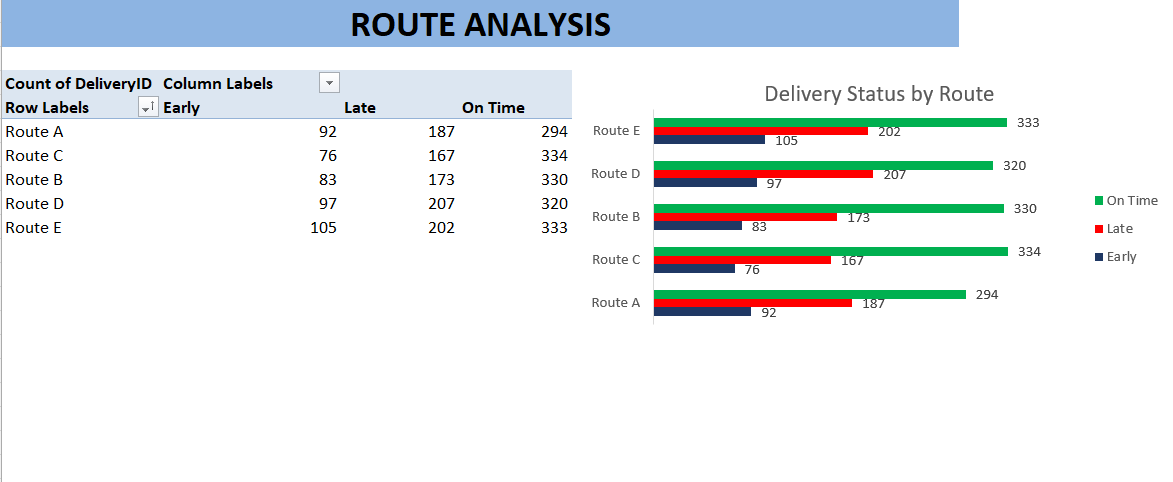
A PivotTable was built with Route as rows and Delivery Status as columns, counting each delivery outcome per route. A Clustered Bar Chart visualised the late vs. on-time split clearly.
Route Analysis
Route Analysis sheet — a PivotTable and Clustered Bar Chart visualising delivery performance across different routes.
4

Vehicle Efficiency Analysis

The same PivotTable structure was applied at the vehicle level. Also, AverageCost Per KM metric was calculated to surface true efficiency — revealing Bikes as the most expensive vehicle despite lowest usage.
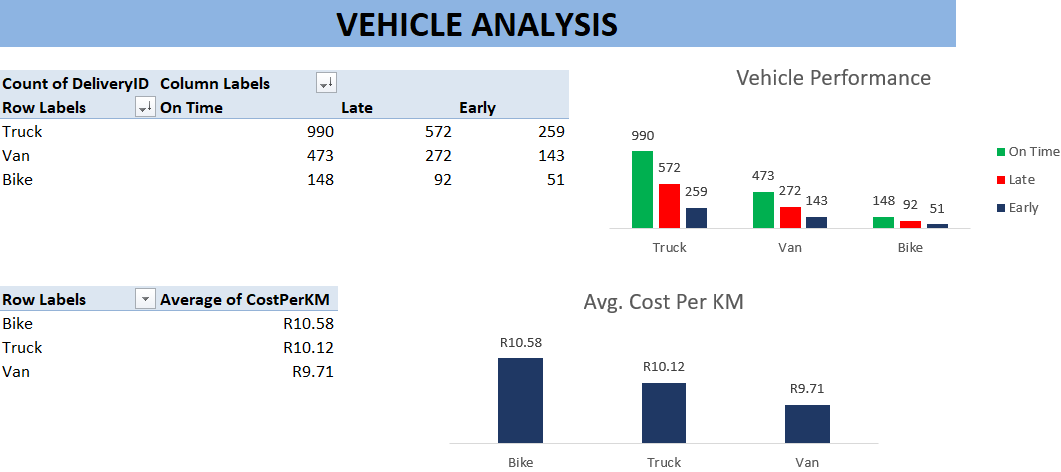
Vehicle Analysis
Vehicle Analysis sheet — a PivotTable and visualisations showing efficiency metrics for different vehicle types.
5

Monthly Trend Analysis

A monthly late rate was computed using COUNTIFS then plotted alongside delivery volume as a Combo Chart — revealing whether demand peaks correlate with quality failures.
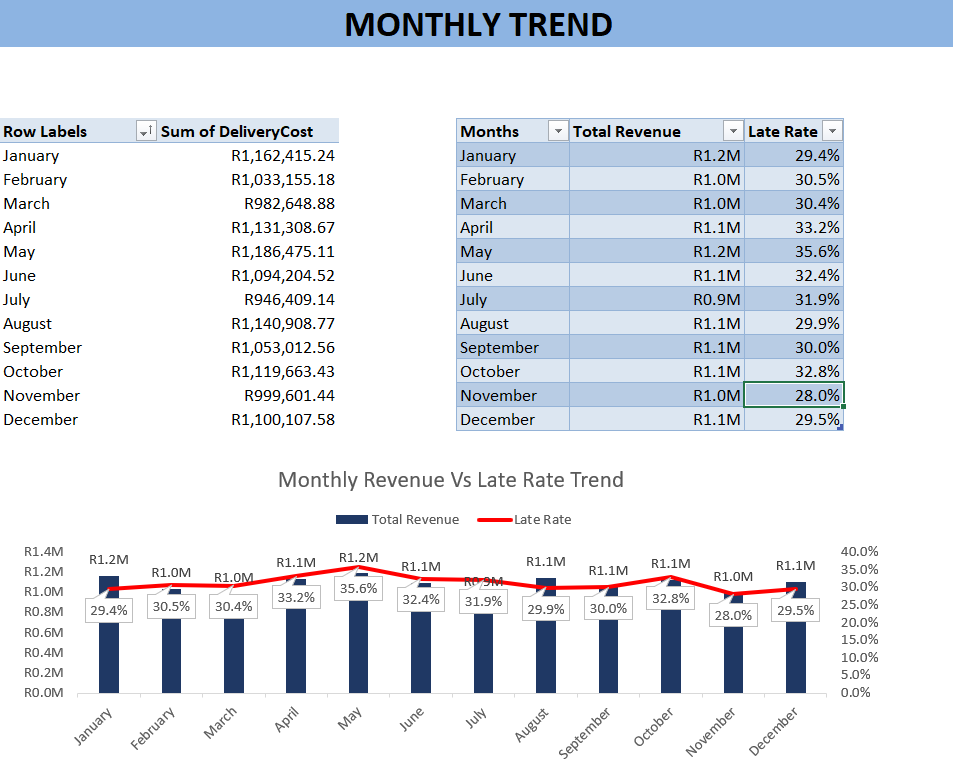
Late Rate % =COUNTIFS(LogisticsData[Month],A2, LogisticsData[DeliveryStatus],"Late") /COUNTIF(LogisticsData[Month],A2)
Monthly Trend Analysis
Monthly Trend Analysis sheet — a Combo Chart showing the relationship between delivery revenue and late rates over time.
6

Interactive Dashboard Assembly

All charts were moved to a single dashboard sheet. KPI cards were linked live to the KPI Summary. Slicers for Route, Vehicle, and Delivery Status were connected to all PivotTables via Report Connections — enabling one-click filtering across every visual simultaneously.
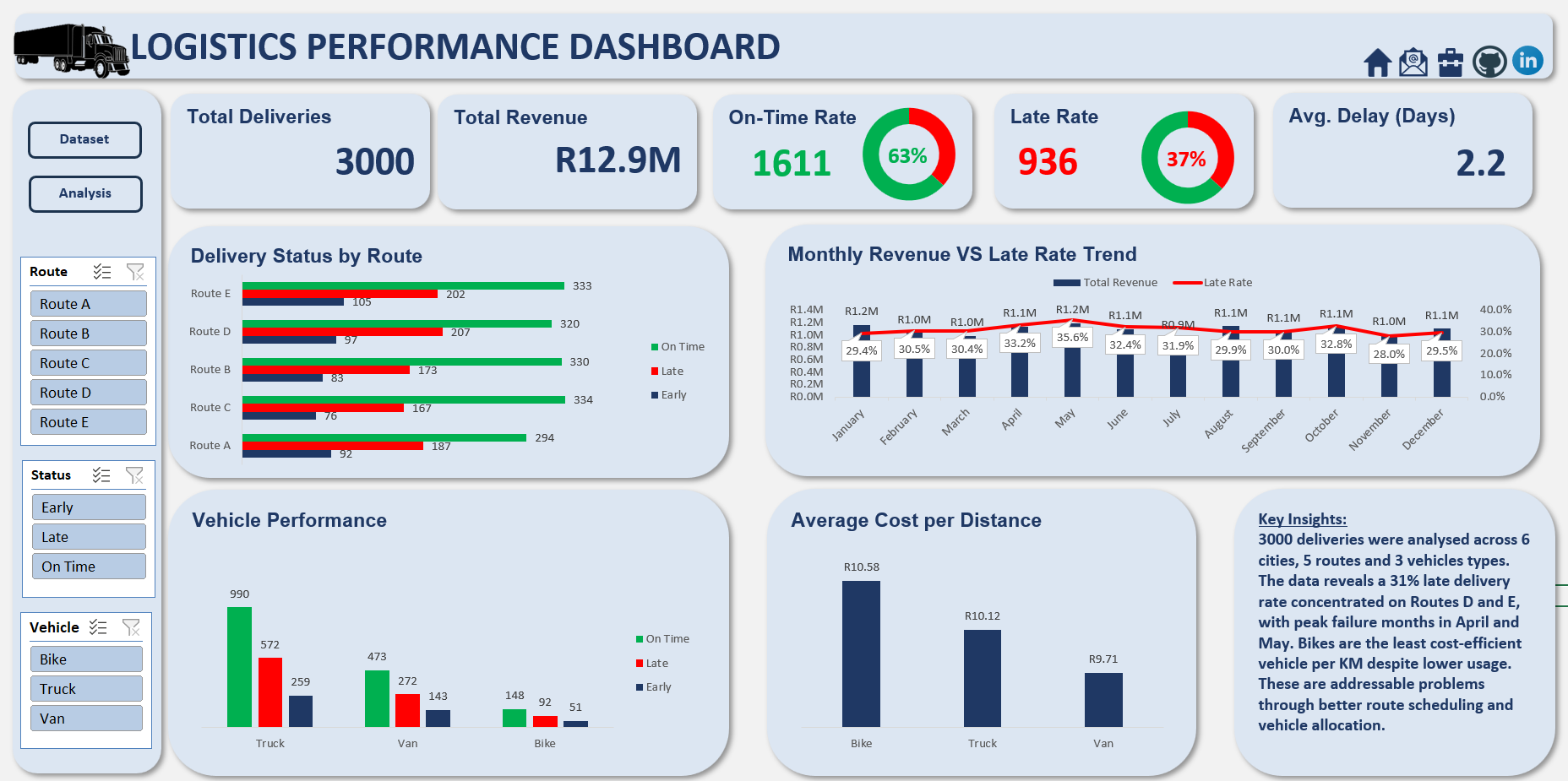
Dashboard
Interactive Dashboard — dark-themed with live KPI cards, slicer-driven charts, and key insights panel. All visuals update simultaneously when a slicer is clicked.
Microsoft Excel PivotTables PivotCharts Aggregate formulas / COUNTIFS / COUNTIF Slicers & Report Connections Combo Charts Structured Table References

What the Data Revealed

Four major findings emerged — each representing a real operational problem that structured data practices can directly address.

Delivery Reliability Crisis

31.2%

of all deliveries arrived late — nearly 1 in 3 orders. Late deliveries averaged 2.2 days overdue, with some running 4 days past deadline.

Route D & E Underperformance

407

combined late deliveries on the two busiest routes. Routes D and E each recorded over 200 late deliveries and need priority scheduling review.

Seasonal Capacity Gaps

Apr–May

showed the highest late rates alongside peak delivery volumes — capacity planning does not scale adequately during demand surges.

Vehicle Allocation Inefficiency

R10.58

cost per KM for Bikes — the highest of all vehicle types despite fewest deliveries. Vans are cheapest at R9.71/km.


How These Insights Drive Revenue Growth

Every finding maps directly to a measurable operational improvement and a real revenue or cost outcome for the company.

FindingCurrent StateRecommended ActionBusiness Outcome
31% Late Delivery Rate 936 late orders Route-level SLA monitoring; flag at-risk deliveries before dispatch using historical delay patterns Higher customer retention, fewer compensation claims, stronger contract renewal rates
Route D & E Failures 407 combined late Investigate scheduling gaps; staggered dispatch or vehicle reallocation on these routes Reducing late rate by 50% on these routes recovers ~200 on-time deliveries protecting SLA bonuses
Peak Month Capacity Gaps Apr & May spikes Monthly demand forecast model; pre-position vehicles and staff ahead of peak periods Prevents late rate spikes during highest-revenue months — protecting income when it matters most
Bike Cost Inefficiency R10.58/km Restrict bikes to short-distance urban deliveries; reassign longer routes to Vans Bringing 291 bike deliveries to Van-level cost efficiency saves R25,000+ annually
15% Early Deliveries 453 early orders Analyse early delivery routes — scheduling slack can absorb additional delivery slots Increase daily capacity without adding vehicles or headcount, improving revenue per asset

A logistics company generating R12.9M across 3,000 deliveries is leaving significant value on the table through avoidable late deliveries, inefficient vehicle routing, and reactive scheduling. Structured data analysis — even in Excel — surfaces these patterns, quantifies their cost, and guides decisions that directly protect revenue and reduce waste. That is the value a data analyst brings to your operations.

View Portfolio →